


PHP, CodeIgniter

Business services

Project Management

Philippines
About The Project
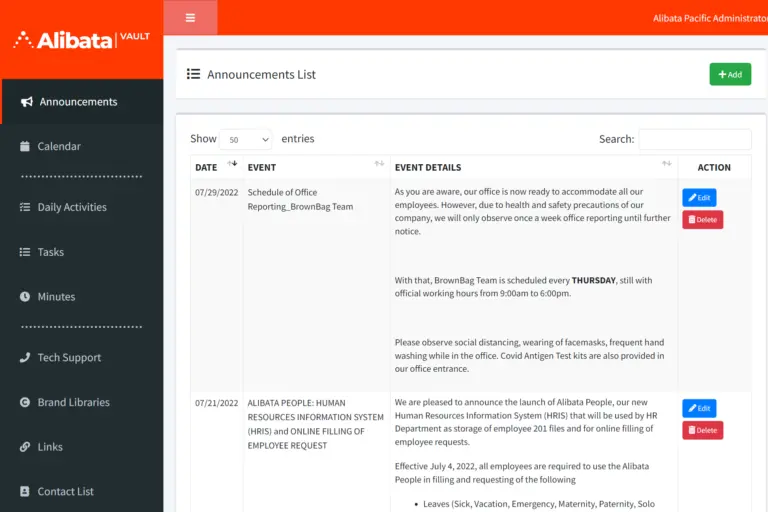
We developed Vault for one of our clients who switched from an on-premises work setting to remote work during the COVID pandemic. They were facing many challenges in team management and collaboration. So, they approached us to build a system that lets the HR team track staff activity and allows employees to easily access technical resources.
Key Features
These are some of the most essential features of the project. They saved considerable time for the client from remote team management.

Timesheet for Task Allocation
We developed a timesheet for employees to manage day-to-day tasks. Project managers can assign tasks to team members from the contact list.

Log Sheet for Daily Activity
The vault features a custom log sheet that allows employees to create and edit their daily tasks. They can even upload their tasks in bulk.

Viber Integration for Messages
Our team integrated Viber into the system, so project managers can get instant notifications for task updates.

Email Integration for Meeting Updates
In case any user has disabled Viber notifications, they will receive notifications via email. We integrated email accounts and set up different triggers, like task modifications and meeting schedules.

Contact List for User Management
To better manage users and their access, we created a contact list that only the super admin can edit. With a simple tick box, they can configure which project functionalities each user can access.

Multiple User Roles for Access
We defined multiple user roles with different access, such as user, business manager, admin, and super admin. Only super admins can change each user’s access.

Major Project Challenges
The client’s primary challenges were remote team collaboration and tracking task progress. They wanted to record the meetings and keep every team member updated about their to-do tasks.
Another requirement was a system that allows them to easily manage each employee’s role and access to projects and tasks. They wanted to change user access upon completion of each project milestone, without any technical assistance.
To keep everyone on the same page, they needed a meeting app like Zoom or Google Meet. They even required a note-taker so that every meeting participant could get a summary of the topics discussed.
For project updates and progress monitoring, they wanted efficient project management functionalities. Each team member should know their daily tasks and deadlines. If any changes are made in the project or a task is completed, the project manager or account manager should be notified.

Solutions & Impact
The client provided us with clear requirements and current challenges. So, it was easy for our development team to solve those problems and create a user-friendly system.
Firstly, we developed a centralized system for the client that allows multiple users with different roles and access. It had a shared sign-in page, but different interfaces for different user roles. Every interface contains a set of common features and unique functionalities based on the user’s role. We also integrated the client’s branding elements and messaging tone into the system, so employees feel familiar while using it.
We created a meeting interface where users can see all upcoming meetings in a table view. Employees also get a form to schedule meetings with different participants and send them invites. Each time a meeting is created, all participants get notified by Viber and email.
Ready to Streamline Your Remote Team Management?
From automated daily log sheets to instant Viber alerts, let’s build a secure, centralized platform tailored to your workflow.
Project in Figures

3
Month

350
Estimated Man-hours

4
Team Size


Applied Technologies


More Screens


