
Quick Summary
- The right Drupal modules can improve your site by making it faster, safer, and easier to manage.
- There are some useful Drupal modules for editing, security, performance, SEO, and daily workflow.
- To choose the right Drupal module, check compatibility, maintenance, and stability. These are the keys to a high-performance Drupal setup.
- With a thoughtful selection, your site remains smooth, organized, and ready to grow without unnecessary issues.
Table of Contents
Using the wrong module can slow your Drupal site. It can cause key features to stop working, leading to time-consuming fixes. But when you choose the right module, you can improve your workflow, boost performance, and keep your site secure with minimal effort.
The challenge is choosing the right option from the best Drupal modules available today. Many look promising, and you might get confused. Some can cause trouble if you pick them without care.
In this blog, we’ll discuss the top Drupal modules that improve stability, protect data, and help your site perform well under pressure. Let’s begin.
Drupal Modules – Core Functions
Drupal has grown a lot since its early days in 2001. Over time, the community built hundreds of modules, and the most essential ones became part of Drupal core. It is the foundation of every Drupal site. It holds the features you need before adding anything extra.
Below is what Drupal core handles for you:
- Tracks logins and basic site activity.
- Offers a built-in search that can look deep into your content.
- Includes caching, lazy loading, and throttling to keep your site fast.
- Lets you create custom content types and easily define new fields.
- Gives you tools to build, manage, and display content lists.
- Creates clean, descriptive URLs so visitors and search engines know what to expect.
- Supports multi-level menus to keep navigation organized.
- Allows multiple sites to run from one code base.
- Supports collaborative content creation when you have many editors.
- Generates RSS feeds and can gather feeds from other sources.
- Alerts you to security updates and new module versions.
- Manages user profiles and access rules, from simple roles to IP and email restrictions.
These built-in features form the backbone of any Drupal project. They give you a stable, secure system that works right out of the box before you add your first contributed module. If you want to make the most of Drupal core features, then you should partner with a Drupal development company.
Top Drupal Modules
Modules are like building blocks of the Drupal architecture that enhance your site’s capabilities. They will make daily management a lot smoother. Below are some of the key Drupal modules that you should know.
Administration & Workflow
These modules decide how you control your Drupal site every day. They reduce the number of clicks and help you find what you need without getting lost in the menus.
Admin Toolbar
The Drupal admin toolbar replaces the platform’s slow, layered menus with a clean drop-down menu. You can jump to any setting without getting lost between the pages. It appears to be a minor upgrade, but it improves how quickly you can move around the backend. The editors and developers will instantly notice the difference.
Administration Menu
The administration menu adds an easy-access menu at the top of your screen. You can access pages from here. It has a compact layout that helps with navigation, especially during development.
Module Filter
Module Filter simplifies the module page by organizing everything into groups. You can search, sort, and locate modules without endless scrolling. For anyone managing many modules, it makes the process much easier.
Diff
Diff shows you what changes when someone edits content. You can see additions, removals, and updates in a clean comparison view. It’s very useful for teams, as it helps to avoid confusion and catch mistakes early. It clarifies your editorial workflow clearly without adding any complexity.
Drush
Drush is a command-line tool that speeds up every task you do in Drupal. Clearing caches, updating modules, and running cron jobs can be done in seconds. Our experts say it’s a must-have tool that they rely on during deployments. Once you use it, the old click-based workflow feels slow and clumsy.
Content Editing & Media
These Drupal modules are designed to make content management easier. They remove unnecessary steps from the process and help save time.
CKEditor
CKEditor is Drupal’s core writing tool, making content editing simple. You can format text, add media, and adjust the layout without coding. It keeps the writing environment clean and familiar, which helps editors stay focused. For most teams, it becomes the key part of their daily workflow.
Field Group
Field Group lets you organize long content forms into sections, tabs, or collapsible blocks. This reduces clutter and makes complex content easier to manage. Editors benefit from a logical layout.
Linkit
Linkit makes internal linking very easy. You can search for articles, pages, or files directly from the link dialogue and insert them instantly. It reduces broken links, and editors won’t need to navigate menus to find them.
IMCE
IMCE provides a simple file browser for uploading and reusing images or documents. It’s straightforward, fast, and easy to understand even for new editors. You can browse folders, rename files, and manage media without extra steps. It removes the friction when you’re handling media inside Drupal.
Pathologic
Pathologic fixes broken or outdated paths within your content. It cleans internal links and media URLs to prevent missing files or errors on pages to prevent missing files or errors on pages. Editors don’t need to search for issues; it automatically finds them.
SEO & Site Visibility
These Drupal modules ensure that your site remains SEO friendly. They help in adding the necessary details and keep the links in place.
Pathauto
Pathauto creates clean, readable URLs so editors don’t have to enter them manually. It follows the rules you set, so every article, page, or category has a consistent path. This makes your site easier for visitors to navigate. It also gives search engines clearer signals about your content.
Redirect
Redirect handles old or changed URLs so visitors never encounter dead ends. You can create simple 301 redirects or let the module automatically catch common mistakes. It protects your SEO and keeps your site’s structure intact as it grows.
Metatag
Metatag adds the metadata that search engines use to understand your pages. You can control titles, descriptions, and social previews from one place. It keeps your content polished when shared and helps improve visibility in search results.
Simple XML Sitemap
This module generates a search-engine-friendly sitemap that updates automatically when new pages go live or old ones change. Search engines can crawl your site more efficiently, which helps new content surface faster.
Global Redirect
Global Redirect prevents duplicate URLs from pointing to the same content. It cleans up paths and sends users to the correct, canonical page. This avoids confusion for visitors and protects your SEO from duplicate content issues. It keeps your site structure clear and consistent.
Security & Access Control
Drupal security and access control modules help in keeping your site safe by adding authentication layers. They ensure your site can’t be accessed without permission.
Shield
Shield adds a basic protection layer to your site by blocking unwanted visitors with a login screen. It’s often used in staging or development environments to prevent search engines from crawling unfinished work. The setup is quick, yet it keeps your private areas out of sight. It gives you a sense of control and a quiet space to build.
Seckit
Seckit makes your site safe by adding security headers. These headers protect your site against common attacks without requiring complex configuration. It’s the kind of module that works quietly but adds real stability.
Environment Indicator
The Environment Indicator highlights which environment you’re working in. It can be development, staging, or production. It adds a small visual cue to prevents accidental changes in the wrong environment. This may sound simple, but it saves developers and editors from costly mistakes.
Performance & Optimization
These modules are designed to improve the performance of your Drupal site.
Lazy-load
Lazy loading improves page speed by loading images only when they come into view. This keeps pages light, especially if they contain many visuals. Visitors experience smoother scrolling and faster load times.
Views
Views is one of Drupal’s most powerful tools, allowing you to build custom lists, grids, and displays without writing code. You can control how content appears and control filters, sorting, and layout with ease.
Forms, Backups & Utilities
These Drupal modules handle the utility aspects of your site.
Webform
The Drupal webform module is the go-to tool for building forms of any kind, from simple contact forms to detailed surveys. Its interface is straightforward, yet it offers deep control when needed. You can collect data, export it, and manage submissions with ease.
Backup and Migrate
Backup and Migrate lets you create quick database backups and restore them when needed. It removes the stress of complex backup processes and provides a safety net you can trust. Scheduled backups keep your data protected even if you forget.
Config Split
Config Split helps you manage different configuration sets for each environment, including development, staging, and production. It keeps experimental changes out of your live site and maintains clean deployments. This brings order to a process that can easily become cluttered. For teams working across multiple environments, it ensures stability.
Bonus Utility
The bonus utility module gives you more serious control over the menu. They help you configure your site more precisely.
Menu Attributes
Menu Attributes gives you finer control over each menu link by allowing custom classes, titles, and extra attributes. This helps designers and developers create navigation with greater ease. It’s especially useful when you want certain links to stand out or behave in a specific way. The module remains simple to use while giving you the freedom to refine your site’s menu structure.
Drupal modules enhance your site by adding features for editing, SEO, security, performance, and workflow. Choosing the right ones simplifies management, boosts efficiency, and keeps your site fast, secure, and easy to maintain. And if you run an eCommerce site, you can also explore Drupal eCommerce modules for added functionality.
What to Consider When Choosing a Drupal Module?
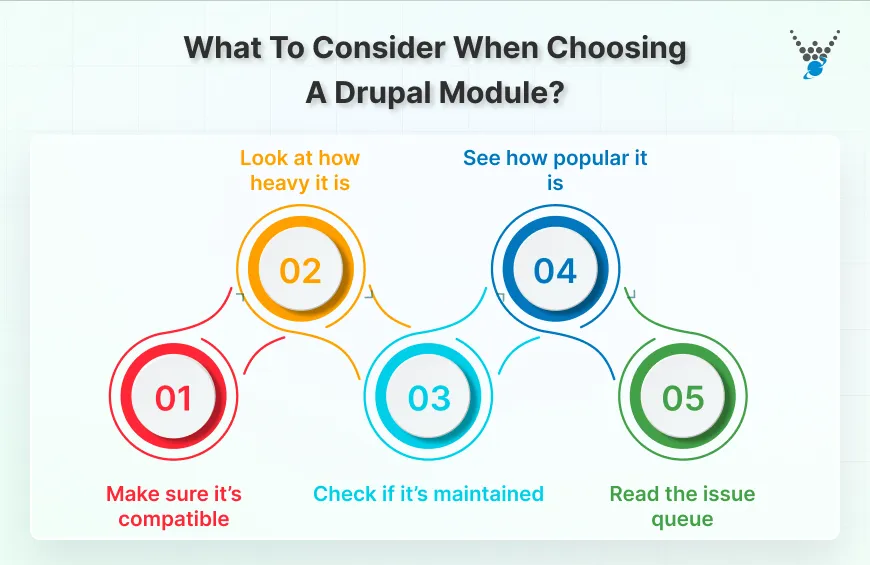
Choosing a Drupal module should be easy, but it’s important to check a few things before installing anything. These quick checks protect your site and help avoid problems later.
1. Ensure compatibility
Verify that the module works with your Drupal version. If it’s not compatible, it can cause errors or issues with some parts of your site. The module page on Drupal.org will tell you which versions it supports.
2. Consider its resource usage
Some modules use more space and resources than others. A heavy module can slow your site, especially on basic hosting. Choose one that performs the task without adding unnecessary load.
3. Check if it’s maintained
A good module is one that its developers still update. Updates fix bugs, patch security issues, and keep things running smoothly. Recent activity on the module page is usually a positive sign.
4. See how popular it is
Popular modules are often more reliable because many people use and test them. Download numbers and user comments can help you understand how stable it is.
5. Read the issue queue
The issue section shows common problems and how quickly they’re resolved. If you see many unresolved issues, it’s a red flag.
By checking these simple points, you can choose modules that are safe, stable, and a good fit for your site. Good modules make Drupal easier to manage and help your site run smoothly.
Summing Up
Drupal becomes much more powerful when you choose the right modules. They make content editing easier, enhance security, improve performance, and help your site stay organized. Each module solves a specific problem and simplifies daily tasks for both editors and developers.
The key takeaway is simple: choose modules carefully. Check compatibility, maintenance, and overall stability before adding anything to your site. A well-chosen set of modules keeps your site fast, secure, and easy to manage.
If you’re ready to use Drupal modules and need help implementing them in your site, you can hire Drupal developers from us.
FAQs on Drupal Modules
How do I add modules in Drupal?
You can add modules by going to Extend in the Drupal admin panel and uploading the module file or installing it directly from a URL. Once it appears in your list, you simply enable it. Some modules may require additional setup, but the basic process is quick. Always check compatibility before installing anything new.
Are Drupal modules free?
Most Drupal modules are free and open-source, created by developers who share their work with the community. You can download and use them without cost. Some advanced or custom modules may come from paid services, but the majority on Drupal.org are free to install and modify.
What is the difference between a Drupal module and a theme?
A module adds new features or enhances how your site works. A theme controls the design, colours, layout, and overall look. Think of modules as the engine and themes as the bodywork. They work together, but each serves a different purpose in shaping your Drupal site.