

Quick Summary
Build a CRM with Laravel to gain control, clarity, and performance. This guide walks developers through core features, practical benefits, and implementation essentials. Learn how Laravel’s clear code, security, and scalability speed development, simplify data handling, and support integrations. Use this roadmap to create a tailored, reliable CRM that improves client experience, streamlines workflows, and accelerates revenue growth. Start building today with confidence and expert guidance.
Table of Contents
Is your customer relationship structure right now just overflowing spreadsheets and scattered notes? If you want to build a CRM with Laravel, it can solve this chaos and bring order to your customer interactions. Overflowing spreadsheets and scattered notes can cause serious confusion, leading to unsatisfactory results and delayed timelines.
So what’s the solution? Customer Relationship Management (CRM) provides a digital haven for organized interactions and improved client satisfaction.
But building a CRM can feel a little daunting. That’s where Laravel comes in, known for its clean syntax and robust features. So, how do you build a CRM with Laravel? Before we move on to the “How,” let’s see why experts prefer this PHP framework for creating this software.
What is a CRM?
Customer Relationship Management, or CRM, is designed to assist businesses in managing interactions with both current and potential customers. It serves as an efficient tool for organizing customer data. That includes contact information, purchase history, and communication logs.
CRMs can enhance customer relationships, improve customer retention, and streamline sales processes. It can also facilitate sales management, customer support, and marketing automation.
A CRM enables businesses to consolidate customer data, monitor interactions, and personalize communication. That results in a better understanding and engagement with customers. Furthermore, CRMs provide valuable insights through analytics and reporting. So businesses can have targeted marketing, efficient task management, and data-driven decision-making.
So why should you hire a experts to build a CRM? Or even build it yourself with Laravel?
Why Build a CRM with Laravel?
Laravel is an excellent choice for building a CRM due to its robust features, scalability, and active community support. The framework provides a solid foundation for creating complex web applications, ensuring efficient CRM development.
Here are a few reasons to build the CRM with Laravel:
- Open-source framework: Laravel is free to use, saving you significant licensing fees compared to proprietary CRM software.
- Reduced development costs: You only pay for the development and customization needed for your specific needs. It helps avoid unnecessary features in pre-built solutions.
- Tailored experience: Build a CRM that perfectly aligns with your unique business processes and workflows.
- Extendable framework: Laravel offers package development and libraries allow you to add specific functionalities as needed.
- Future-proof solution: Laravel’s scalability isn’t limited to CRM systems – it’s also ideal for enterprise application development, where performance, security, and modular architecture are essential.
- Modern architecture: Laravel offers a robust and secure foundation for building web applications.
- Scalability: The framework easily scales to accommodate increasing data and user demands.
- Security features: Laravel security practices help protect your customer data.
Building a CRM with Laravel offers a powerful and cost-effective way to manage your customer relationships. So, how do you go about building the customer relationship management system with Laravel?
Key Features of a Laravel CRM System
A powerful CRM in Laravel does more than just store contacts. It organizes your business, streamlines operations, and helps your team work smarter. Here are the essential features that make a Laravel CRM truly effective:
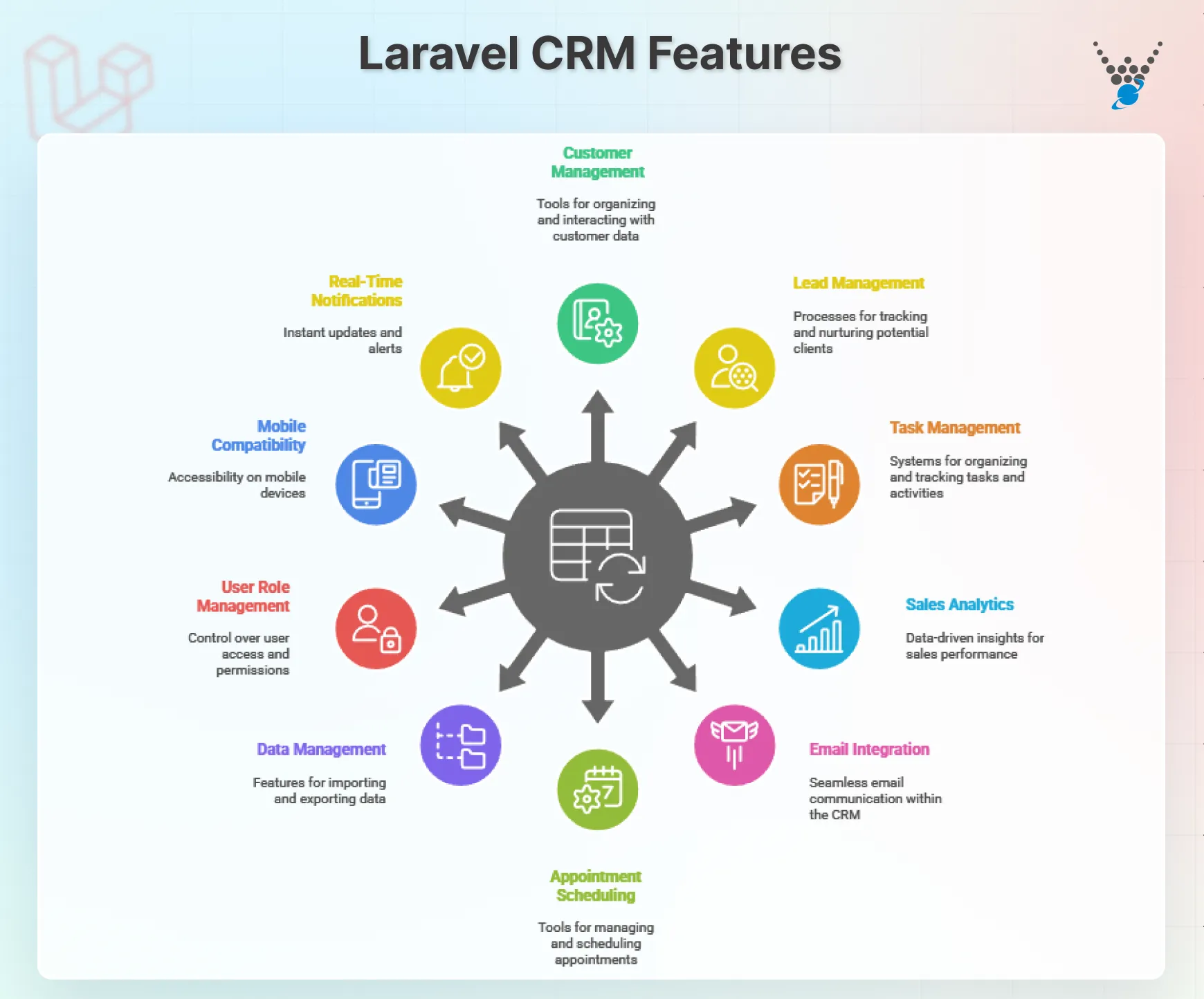
- Customer Management: Keep all client information in one place. Store details, track interactions, and quickly access any record.
- Lead and Opportunity Management: Monitor leads from first contact to conversion. Understand where opportunities are and which require follow-up.
- Task and Activity Management: Assign tasks, set deadlines, and track progress. Make sure nothing falls through the cracks.
- Sales and Reporting Analytics: Generate detailed sales reports and analytics. Make decisions based on clear, real-time data.
- Email Integration: Send and receive emails directly through the CRM. Keep communication organized and centralized.
- Appointment Scheduling: Manage meetings and appointments effortlessly. Ensure your team and clients stay on schedule.
- Data Import and Export: Easily move data in and out of the system. Maintain smooth workflows and system flexibility.
- User Role Management: Control access with roles and permissions. Keep sensitive information secure while encouraging collaboration.
- Mobile Compatibility: Access your CRM on the go. Stay productive from anywhere, on any device.
- Real-Time Notifications: Get instant alerts for tasks, leads, and updates. Never miss an important event or follow-up.
Similarly, framework can also power feature-rich Laravel for eCommerce applications that handle complex transactions, customer data, and analytics efficiently.
How to Build a CRM with Laravel?
Creating a customer relationship management system with Laravel can be a little tedious. But with the right approach and a step-by-step process, you can make it easier. Let’s take a look.
Define the Requirements and Scope of the CRM
First off, you need to define the requirements and scope of your CRM. That ensures your system truly addresses your business needs and avoids costly detours. Here are a few questions that you should consider:
- What are your primary objectives for building a CRM? Do you aim to improve lead generation, streamline sales processes, enhance customer service, or a combination of these?
- What are the current challenges you face in managing customer relationships? Are you struggling with disorganized data, inefficient workflows, or lack of visibility into customer interactions?
- Who will be using your CRM on a daily basis? Sales representatives, customer service agents, marketing teams, or a combination?
- What are the essential features your CRM absolutely needs to have? This could include contact management, deal pipeline tracking, task management, reporting, and communication tools.
- Are there any additional features you’d like to include in the future, that aren’t essential at launch? This could involve integrations with third-party tools, advanced reporting capabilities, or AI-powered insights.
Make sure you involve stakeholders from different departments, like sales, marketing, design, etc., in the requirement-gathering process. And I suggest you start with a Minimum Viable Product (MVP) and iterate based on user feedback.
Set up the Development Environment
After defining the CRM requirements, you need to set up the development environment. But before that, understand the system requirements.
- Operating System: While Laravel is platform-independent, Windows 10, macOS, or Linux (e.g., Ubuntu) are popular choices.
- PHP: Version 8.0 or later is recommended for optimal performance and security.
- Web Server: Apache or Nginx are common options, often included with PHP installations.
- MySQL or PostgreSQL: These are popular database management systems compatible with Laravel.
- Composer: Package manager for installing Laravel and its dependencies.
- IDE or Code Editor: Choose one you’re comfortable with (e.g., Visual Studio Code, Sublime Text, PHPStorm).
Considering these system requirements, proceed with the setup.
Step 1: Follow the official guides and install PHP for your chosen operating system. Then, ensure PHP modules like cURL, GD Library, and XML are enabled. Configure your web server (e.g., Apache virtual hosts, Nginx server blocks) to serve your Laravel application.
Step 2: Download and install Composer from the official website. Add the Composer bin directory to your system’s PATH environment variable.
Step 3: Use Composer to create a new Laravel project:
composer create-project laravel/laravel my-crm-project
Replace my-crm-project with your desired project name. This command creates the project directory structure and installs all Laravel dependencies.
Step 4: Edit the .env file in your project directory to configure database connections. Specify database credentials (host, username, password, database name). And choose between MySQL or PostgreSQL and adjust configurations accordingly.
Step 5: Secure your environment by setting a strong application key: php artisan key:generate. Also, you need to enable environment variables for sensitive info like passwords and API keys.
To simplify integration and add ready-made functionalities, need to know best Laravel eCommerce packages that enhance performance and reduce development time.
Design the Database Structure
The heart of any CRM lies in its data structure. Designing an efficient and scalable database is crucial for storing and managing customer information, interactions, and transactions. Here’s how this stage of the process goes:
Step 1: Identify the key entities your CRM will manage. It typically includes:
- Contacts: Individuals associated with your customers (e.g., name, email, phone number, company affiliation).
- Companies: Organizations you interact with (e.g., name, industry, location, website).
- Deals/Opportunities: Potential sales or service engagements (e.g., value, stage, timeline, key contacts).
- Activities: Interactions with customers, like calls, emails, meetings (e.g., type, date, notes, participants).
- Tasks: Action items related to sales or service (e.g., due date, assignee, priority).
Depending on your needs, you might include other entities like products, invoices, tickets, surveys, etc.
Step 2: Define the relationships between the entities. For example:
- A contact belongs to one company (one-to-many relationship).
- A deal can have multiple associated contacts (many-to-many).
- An activity relates to a specific contact, deal, or other entity.
Define the cardinality (one-to-one, one-to-many, many-to-many) for each relationship.
Step 3: For each entity, create a data model specifying its attributes (columns) and data types. Consider:
- Identify essential information for each entity (e.g., contact name, email, company name).
- Include additional relevant details based on your needs (e.g., contact job title, social media handles).
- Normalize your data to avoid redundancy and improve efficiency.
You can also use appropriate data types (e.g., integers for IDs, strings for names, timestamps for dates).
Step 4: Translate your data models into database tables with defined columns and data types. Use foreign keys to establish relationships between the tables.
A contact table might have a foreign key referencing the company table (one-to-many). A deal table could have multiple foreign keys referencing different contact tables (many-to-many).
Step 5: Optimize the system for performance and scalability by indexing the frequently-used columns to improve the query speed. And use appropriate table structures and data types to optimize storage and retrieval.
You can use database design tools or diagrams to visualize relationships and ensure clarity. Make sure you follow standard naming conventions for tables and columns for better readability. The same structured and scalable approach can be applied if you plan to build a property listing app with Laravel, where efficient data models and relationships play a critical role.
Create the User Interface
The user interface (UI) is the face of your CRM, shaping how users interact with your application and ultimately impacting their experience. Designing an intuitive and user-friendly UI is crucial for ensuring user adoption and success with your CRM. Here’s a breakdown of key considerations:
- Identify different user personas: Consider sales reps, customer service agents, and administrators, each with specific needs and workflows.
- Conduct user research: Gather feedback through surveys, interviews, or usability testing to understand user pain points and expectations.
- Navigation: Implement a clear and intuitive navigation structure, so users can find information and complete tasks quickly.
- Dashboards and Overviews: Provide customizable dashboards summarizing key metrics and activities relevant to each user role.
- Search and Filtering: Make it easy for users to search for specific contacts, deals, or data points using relevant filters.
- Forms and Data Entry: Design streamlined forms with clear labels and validation to minimize errors and frustration.
- Responsiveness: Ensure your UI adapts seamlessly to different screen sizes and devices for mobile usage.
- Maintain consistency: Employ a consistent visual theme (colors, fonts, icons) aligned with your brand identity.
- White space and visual hierarchy: Use white space effectively to improve readability and guide users’ focus.
- Accessibility: Design your UI to be accessible to users with disabilities, following WCAG guidelines.
- Interactive elements: Use icons, buttons, and animations judiciously to enhance user engagement and interaction.
- Blade Templates: Leverage Laravel Blade components for dynamic content generation and reusable UI components.
- Laravel Collective Packages: Utilize packages like Scout, Telescope, Livewire, and Jetstream for UI elements and functionalities.
- Bootstrap or Tailwind CSS: Consider using popular CSS frameworks for rapid UI development and responsive design.
- Conduct usability testing with real users: Observe their interactions and gather feedback to identify areas for improvement.
- A/B testing: Use A/B testing to compare different UI elements or layouts to determine what works best for your users.
- Gather user feedback through surveys and support channels: Continuously iterate and refine your UI based on user input.
Following these guidelines, you can create a highly user-friendly and engaging interface that fuels your CRM’s success.
Implement Business Logic and Functionality
Finally, you need to implement the business logic and functionality in your Laravel CRM. Here’s an in-depth explanation on this stage.
Step 1: Clearly define the specific features and functionalities your CRM needs to offer. Map these features to user personas and workflows for each user role. And then, break down features into smaller, more manageable tasks to simplify the development process.
Step 2: Utilize Laravel’s core features like models, controllers, and routing to implement basic functionalities. Explore Laravel Eloquent techniques for efficient database interactions and data manipulation. You should also consider Laravel middleware for authorization (through Laravel Policies and Gates) and authentication (with Laravel Sanctum).
Also, use Laravel Events for handling asynchronous tasks and background processes.
Step 3: Group related functionalities into logical modules (e.g., contact management, deal pipeline, reporting). Each module should encapsulate its own business logic and data access. And use Laravel services or helper classes to organize complex logic and improve code reusability.
Step 4: Implement robust data validation mechanisms to ensure data integrity and prevent errors. You should also sanitize user inputs and apply appropriate data types before storing or processing. Also, adhere to Laravel’s built-in security features and practices like password hashing and access control.
Step 5: If needed, integrate with external services for functionalities like email sending, payment processing, or third-party APIs. You can also use Laravel packages or libraries to simplify integration and manage API calls.
Step 6: Write unit tests for individual functionalities and integration tests for modules. And use the popular frameworks like PHPUnit, along with the best Laravel testing best practices.
Remember, implementing business logic is an iterative process. So make sure you gather user feedback and improve the CRM continuously.
If you’re looking for a more hands-on approach, consider checking out existing open-source CRM projects built on Laravel. And you can consult with a professional Laravel development agency for the best results.
Benefits of Laravel for CRM Development
Laravel is a developer’s toolkit for building powerful, scalable, and secure CRM systems. Let’s look at the benefits of Laravel for CRM development:
- Clean and Readable Code: Laravel’s elegant syntax makes code easy to read and maintain. Developers can focus on functionality instead of fighting complex structure.
- Rapid Development: With built-in tools and libraries, Laravel accelerates development. You can build a feature-rich CRM faster without compromising quality.
- Robust Security: Laravel comes with strong security features. It protects sensitive client data with encryption, authentication, and role-based access.
- Scalable Architecture: Laravel’s modular design allows your CRM to grow with your business. Adding new features or handling more users is seamless.
- Database Management Made Easy: Laravel’s Eloquent ORM simplifies database operations. You can easily manage customer records, leads, and sales data.
- Community and Support: Laravel has a large, active community. Developers have access to tutorials, packages, and expert advice, which makes problem-solving faster.
- Customizable and Flexible: You can tailor your CRM to exact business needs. From dashboards to reports, every component can be customized efficiently.
- Integrated Testing: Laravel supports automated testing. Bugs are caught early, ensuring your CRM runs smoothly and reliably.
Using Laravel for CRM development doesn’t just make building software easier – it ensures a system that’s secure, scalable, and easy to maintain. For developers, it strikes the perfect balance between simplicity and power.
Let’s Conclude
Building a CRM with Laravel might seem like a daunting task. But with careful planning, dedication, and the right resources, you can transform your customer relationships for the better.
So here’s the step-by-step guide to build a CRM with Laravel:
- Define the Requirements and Scope of the CRM
- Set up the Development Environment
- Design the Database Structure
- Create the User Interface
- Implement Business Logic and Functionality
So, need help with Laravel CRM development? Then consult with our Laravel developers for hire today!
FAQs on Building CRM with Laravel
How much time does it take to build a CRM with Laravel?
The time depends on the complexity of your requirements, your development experience, and the features you want to include. Start with an MVP (Minimum Viable Product) and iterate based on user feedback.
What are the challenges of building a CRM with Laravel?
The challenges associated with building a CRM with Laravel include:
– Requires technical expertise in Laravel and related technologies.
– Time commitment for development and maintenance.
Ongoing updates and security patches needed.
To navigate these challenges, you can consult with our dedicated Laravel developers.
Should I hire professionals to build my CRM?
If you lack the technical expertise or time, hiring a dedicated Laravel development service provider can be beneficial. They can ensure a secure and well-structured CRM while saving you development time.
Is a custom Laravel CRM better than ready-made solutions?
A custom Laravel CRM is built to fit your exact business needs. Unlike ready-made solutions, it gives you flexibility, full control over features, and better scalability. It may take more time to set up, but the result is a system tailored to your workflow.
Can I integrate my Laravel CRM with other business tools?
Yes. Laravel CRM can connect with emails, marketing tools, accounting software, and more. Its modular structure and APIs make integration smooth, keeping all your business operations connected in one place.
Can a Laravel CRM help increase sales and revenue?
Absolutely. By organizing leads, tracking opportunities, and automating tasks, a Laravel CRM improves efficiency. Better insights and streamlined processes help your team close deals faster and grow revenue.