

Quick Summary: React Native for Web enables developers to use React Native components and shared application logic across iOS, Android, and web browsers. It provides a compatibility layer that translates React Native primitives into web-compatible DOM elements while supporting shared styling, layouts, gestures, and platform-specific code. This guide explains how React Native for Web works, its key benefits and limitations, how to create and deploy a web application with Expo, and where it can be used in real-world cross-platform applications.
React Native for Web allows you to build web applications using React Native components while sharing code across mobile and web platforms. Instead of maintaining completely separate implementations for iOS, Android, and the browser, developers can use a common codebase and let React Native Web translate mobile-oriented components, styles, and interactions into web-compatible elements.
But using React Native for Web is more than simply running a mobile application in a browser. Its architecture includes module resolution, style translation, event normalization, and platform-specific code patterns that determine how well an application works across different environments. Understanding these fundamentals is important before adopting the technology for a production project.
This guide walks you through the step-by-step process to create React Native for Web; you can also approach a leading React Native development company for your project.
Fundamentals of React Native for Web
The following are the fundamentals of React Native Web:
1. The Compilation & Runtime Architecture
React Native for Web works by acting as a dependency injection and translation layer. At runtime, it sits entirely between your application code and standard React DOM.
Module Resolution Aliasing:
The framework relies heavily on compile-time bundler hijacking. When a bundler like Webpack, Vite, Metro, or Rollup comes across an import from ‘react-native‘, your configuration forces it to dynamically map to the ‘react-native-web’ package instead.
Accessibility Mapping:
To meet web standards, React Native for web provides native mapping from mobile semantic props to browser-valid WAI-ARIA elements. This ensures application readability for screen readers and search engine web scrapers.
2. The Atomic Stylesheet Engine
Traditional web applications often suffer from CSS bloating, specificity wars, and unpredictable class cascades. React Native Web sidesteps these problems using an Atomic CSS-in-JS engine built right into its StyleSheet.create() method.
When you define a style object, the compiler deconstructs it. Instead of creating a huge block of styles for a single component class, it splits every single key-value style rule into a completely independent, unique, reusable atomic utility class.
// Input JavaScript Code
const styles = StyleSheet.create({
  boxA: { display: 'flex', backgroundColor: 'blue', margin: 10 },
  boxB: { display: 'flex', backgroundColor: 'red', padding: 20 },
});
The runtime extracts these styles and injects them as a single <style> tag into the HTML document header, converting the elements like this:
<!-- Automatically Generated Global Header Style Sheet -->
<style>
  .r-display-flex { display: flex; }
  .r-bg-blue { background-color: blue; }
  .r-bg-red { background-color: red; }
  .r-margin-10 { margin: 10px; }
  .r-padding-20 { padding: 20px; }
</style>

<!-- Rendered DOM Output Components -->
<div class="r-display-flex r-bg-blue r-margin-10"></div>
<div class="r-display-flex r-bg-red r-padding-20"></div>
Layout Engine Deviations
- Flexbox Defaults: The web naturally defaults to a row layout with elements stretching horizontally. React Native for Web explicitly overrides this behavior by setting flexDirection: ‘column’, alignItems: ‘stretch’, and position: ‘relative’ across structural elements to mirror native layouts.
- Measurement Standardization: Pure unitless numbers passed to layout properties (e.g., width: 50) are intelligently parsed and converted into standard browser pixel counts (width: 50px).
3. Gesture Responder and Event Normalization
Mobile touch systems interact completely differently than desktop pointer systems. Web browsers utilize distinct mousedown, mousemove, and mouseup events, while mobile engines monitor raw multitouch streams.
React Native for Web embeds a sophisticated Gesture Responder System that normalizes web inputs. It takes all standard web pointer vectors and normalizes them down to the platform-agnostic React Native touch API loop:
[Web Mouse / Pointer Inputs]  ──┐
                                ├─► [Event Normalizer] ─► Responder Lifecycle Actions
[Mobile Touch Interactivity]  ──┘                          (onResponderGrant, onResponderMove)
This transaction lets elements like Pressable, TouchableHighlight, and PanResponder work identically in a desktop Chrome window using a mouse to track drag-and-drop actions, or on a physical Android device tracking an actual thumb swipe.
4. Cross-platform Code Architecture Patterns
Building an enterprise-scale multi-platform app means cleanly abstracting features that cannot cross the platform barrier, such as native mobile hardware sensors versus browser session storage.
Strategy 1: Direct Branching via the Platform API
For simple, quick UI or layout deviations, use the Platform.select module to execute environment-specific logic inline.
Strategy 2: File Extension Splitting (Structural Architecture)
For complex interactions, native library integrations, or heavily optimized responsive components, separate your implementation logic cleanly using specialized file extensions. The bundler handles compiling the correct code block automatically based on destination targets:
- MapComponent.android.js: Compiles specifically for Android devices
- MapComponent.ios.js: Compiles specifically for iOS devices
- MapComponent.native.js: Fallback shared by both iOS and Android
- MapComponent.web.js: Compiles specifically for web browsers
5. Production Framework Architectures
Setting up a bare-Metal React Native for Web configuration manually requires substantial custom Webpack, Babel, and CSS loader overrides. To build at scale, production architectures use highly optimized meta-framework ecosystems:
- Expo: The recommended industry standard for React Native development. Expo features a unified bundler engine that compiles out-of-the-box universally, abstracting away individual platform configuration while providing extensive, pre-engineered web compatibility fallbacks.
- Tamagui / Gluestack: Specialized UI toolkits designed to work seamlessly with React Native for Web. They use compile-time optimization scripts to turn styling components into fast, native CSS utilities, resulting in significantly lower web application bundle sizes and faster initial page loads.
Why Should You Use React Native for Web?
The following are the core reasons developers use React Native for Web:
A Quick Overview
| Benefit | Core Technical Value | Business Impact |
|---|---|---|
| Single Codebase | Reuses components, state logic, and APIs across iOS, Android, and web browsers. | Drastically simplifies maintenance and platform feature parity. |
| Significant Cost Savings | Removes the need for independent web (React/HTML) and mobile engineering teams. | Reduces engineering overhead and long-term support costs. |
| Smooth User Experience | Translates universal UI primitives directly into native browser DOM elements. | Ensures highly responsive, fluid interactions and layout consistency. |
| Faster Time-to-Market | Features layout uniformity (Flexbox) and real-time environment compilation. | Allows cross-platform updates to be built, tested, and shipped in parallel. |
| Advanced Interaction Support | Implements a robust multi-touch and unified gesture responder system. | Delivers seamless handling of touch, mouse hover, and complex multi-modal inputs. |
1. Maintain a Single Codebase
Instead of rewriting logic for distinct platforms, React Native for Web creates a unified development pipeline where 80% to 90% of your application logic is shared. Data models, network layers, hooks, and presentation logic are written exactly once. By using cross-platform primitives such as <view>, which compile directly into a standard browser <div>, your core digital identity functions flawlessly across mobile screens and desktop monitors.
2. Save Significant Costs
Maintaining separate engineering teams for iOS, Android, and traditional Web apps is incredibly expensive. By consolidating development under a single JavaScript/TypeScript team, businesses eliminate massive overhead costs. Bug fixes, API updates, and feature expansions roll out universally, cutting long-term maintenance costs by up to 40% compared to fragmented native setups.
3. Smooth User Experience
Unlike traditional hybrid platforms that sluggishly trap webpages inside mobile webviews, React Native for web bridges apps in reverse. It takes powerful, native mobile design structures and renders them directly onto the web utilizing optimized browser elements. Using a shared styling architecture built entirely on Flexbox, it ensures your UI elements scale cleanly, load quickly, and animate smoothly across all viewport shapes and sizes.
4. Faster Time-to-Market
Launching products simultaneously across multiple deployment storefronts becomes streamlined. Development accelerators like Fast Refresh/Hot Reloading let developers see updates render live across browser environments and mobile simulators without waiting for slow project recompilations. Startups and enterprises can launch a minimum viable product (MVP) ahead of schedule, validating cross-platform market strategies rapidly.
5. Advanced Interaction Support
Web browsers and mobile devices process physical user inputs in fundamentally different ways. React Native for Web bridges this gap with a sophisticated interaction architecture. It maps complex mobile gesture responses and multi-touch behaviors cleanly over to mouse dragging, scrolling, pointer events, and keyboard interactions. The result is an application that feels naturally tactile on a touch screen and reliably precise on a desktop.
How to Create a React Native Application for the Web?
The following is the step-by-step process to create a React Native application for the web:
Step 1: Create a New Expo Project
Open a terminal or command prompt and run these commands:
npx create-expo-app myWebApp
cd myWebApp
This creates a ready-to-use React Native project with built in web support. The first command downloads the template files and sets up the latest configuration, while the second moves your command-line environment into the newly created project directory.
Step 2: Open the Project
Open the folder in your editor (VS Code recommended)
The project structure will look like:
myWebApp/
├── App.js        👈 main file (you will edit this)
├── package.json
├── node_modules/
├── assets/
This structural layout shows your core project files. App.js serves as the entry point for your application’s UI, package.json manages your dependencies and scripts, node_modules stores the installed packages, and assets holds static files like images and fonts.
Step 3: Run the App on the Web
Run the following command in the terminal or command prompt
npm run web
Now, let’s understand what this command will do:
- Starts the development server
- Opens the browser automatically
- Runs your React Native app as a web app
The output is like this:
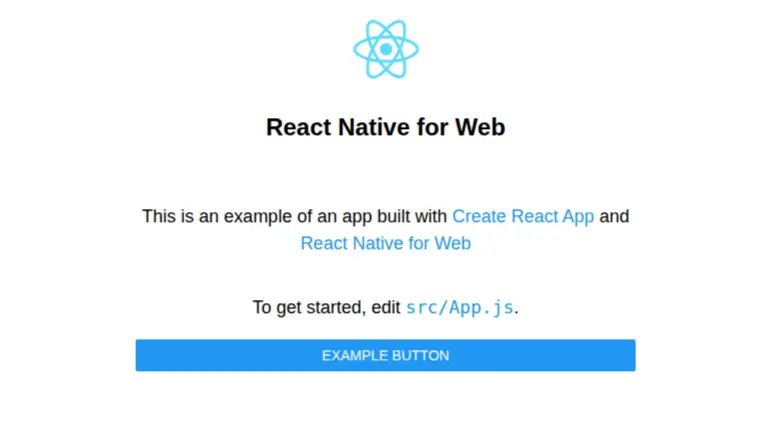
Step 4: Edit Your First Screen
Open App.js and replace it with the following:
import { View, Text, StyleSheet, Pressable } from 'react-native';

export default function App() {
  return (
    <View style={styles.container}>
      <Text style={styles.title}>Hello World</Text>

      <Pressable style={styles.button}>
        <Text style={styles.buttonText}>Click Here</Text>
      </Pressable>
    </View>
  );
}

const styles = StyleSheet.create({
  container: {
    flex: 1,
    justifyContent: 'center',
    alignItems: 'center',
  },
  title: {
    fontSize: 24,
    marginBottom: 20,
  },
  button: {
    backgroundColor: '#2563eb',
    padding: 10,
    borderRadius: 6,
  },
  buttonText: {
    color: '#fff',
  },
});
You will get the output like the following:

Step 5: Verify It’s Running on the Web
Open browser DevTools → inspect element
You will notice
View → <div>

Text → <span>
This conversation is handled by React Native for Web.
When you look at the DOM tree in the browser inspect panel, you can see how mobile primitives are dynamically translated into standard web components. The custom container layout is converted into structured HTML tags styled via CSS-in-JS.
Step 6: Build for Production
Run the following command in the terminal or command prompt
npm run build:web
This guarantees:
web-build/
This folder contains:
- HTML
- JS bundle
- CSS
This step optimizes and minifies your source code. It strips out development checks, compresses your assets, and outputs a highly performant, static distribution folder optimized for rapid loading over the internet.
Step 7: Run Production Build Locally
npx serve web-build
Opens your production version in the browser.
This command fires up a lightweight, local static file server directed at your build folder. It allows you to review the exact performance, rendering behavior, and final bundle composition of the optimized site before sending it live.
Step 8: Deploy Your Web App
You can deploy the web-build folder using:
- Netlify
- Vercel
- GitHub Pages
Because the guaranteed output consists purely of static HTML, JavaScript, and CSS files, you can upload the build folder contents directly to any modern static hosting provider to launch your application live on the Web.
Limitations of React Native for Web
First, you need to understand the difference between ReactJS and React Native. ReactJS is a JavaScript library for building web applications that run in a browser, while React Native is a complete framework for building cross-platform mobile apps for iOS and Android. As we have already discussed the benefits of ReactJS along with some limitations, here are some limitations of React Native for Web that you should consider:
1. Architectural and Performance Overheads
- Larger Bundle Size: Including the React Native for Web abstraction layer over a standard React DOM adds weight, leading to larger JavaScript binaries and slower initial load times.
- Layout Inefficiencies: Complex web layouts or intensive enterprise dashboards can suffer from client-side rendering bottlenecks and layout recalculation issues.
- Single-threaded Constraints: JavaScript handles UI calculation on a single thread. Highly complex, calculation-heavy layouts or dense UI animations often fall short of native web fluidity.
2. Missing Core Components and API Mismatches
- Unsupported Mobile Features: Mobile-specific hardware APIs, such as the accelerometer, gyroscope, or Bluetooth, do not translate over a web browser environment, forcing you to implement web fallback logic.
- Missing Components: Not every core mobile component exists out-of-the-box on the web version; for example, RefreshControl, requiring you to build custom web wrappers using unverified third-party libraries.
- Incompatible Libraries: A large portion of the React Native community ecosystem relies on underlying iOS/Android native code, making them completely incompatible with the browser without custom configurations.
3. SEO and Routing Obstacles
- Suboptimal Search Visibility: By default, React Native for Web relies heavily on client-side rendering (CSR), which degrades SEO performance. Overcoming this requires adding heavy external frameworks like Next.js or Expo Router.
- Navigation Paradigm Mismatches: Mobile apps lean on stack-based navigation, such as React Navigation, whereas the web inherently relies on URL-based, file-system routing. Seamlessly bridging these two philosophies has historically been difficult.
4. Severe Styling and UX Constraints
- Limited CSS Feature Set: Styling inherits the flexbox-focused subset of React Native. You will lose Native CSS mechanics like pseudo-classes (:hover, :focus), sibling selectors, advanced grid systems, and certain media queries unless you layer on CSS-in-JS tools.
- Unnatural UX Paradigms: Desktop web users expect distinct UI behaviors like right-click context menus, advanced hover states, and responsive fluid layouts that are highly complex to fluidly mirror with mobile-first primitives.
Use Cases of React Native for Web
The following are some use cases of React Native for Web:
1. Meta
As the primary maintainer of React Native, Meta uses React Native for the web to establish structural continuity between its mobile applications and its massive web properties.
- Facebook Marketplace & Ads Manager: Meta uses the web implementation to port complex, data-heavy mobile modules directly into desktop browsers. This ensures a uniform look, feel, and feature set across platforms without needing to write dedicated CSS/HTML from scratch.
- Messenger Desktop: By leveraging React Native for Web paired with desktop Electron wrappers, Meta delivers native-feeling desktop experiences using their existing mobile UI foundation.
2. X (Formerly Twitter)
React Native for Web was actually created at Twitter by an engineer, Nicolas Gallagher, while rewriting the mobile web experience.
- Twitter Lite & The Main Web App: X relies on React Native Web to power its entire core web interface. By converting mobile building blocks directly into raw DOM nodes, X achieved an incredibly lightweight, fast, and accessible PWA optimized for slow network environments and lower-end mobile devices.
3. Flipkart
India’s eCommerce giant was an early adopter of React Native for web to solve multi-platform divergence.
- The Shared Shopping Experience: Flipkart utilizes the framework to share critical architectural code and components between its popular Android/iOS mobile apps and its mobile web/desktop platforms. This builds interactive item carousels, complex checkout workflows, and user review models once, enabling rapid feature delivery across all screens simultaneously.
4. Uber Eats
Uber famously deployed React Native to solve a specific business problem for its restaurant partners.
- The Partner Dashboard: Instead of building different apps for tablets and web-connected restaurant computers, Uber developed its Restaurant Dashboard using React Native.
- Embedded Ordering Experiences: By using React Native for Web, Uber can embed the food-ordering flow directly inside other native web environments, such as a seamless WebView within the standard Uber Rider application, allowing users to order food without installing the full standalone app.
5. Expo Ecosystem & Partners
In modern development, Expo is the official framework Meta recommends for building React Native applications.
- Out-of-the-box Web Compilation: Expo natively embeds React Native for Web into its architecture. When you build a project using Expo tools, running npx expo start instantly generates fully functional iOS, Android, and Web versions simultaneously from a single codebase.
- Universal Routing (expo-router): Through Expo’s partner ecosystem, tools like expo-router finally solved the “Universal Navigation” puzzle. It lets developers build a single file-system-based router that natively renders links on mobile and SEO-friendly anchor links on the web.
Final Thoughts
React Native for Web provides a practical way to extend a React Native codebase to the web while maintaining shared components, business logic, styling patterns, and interaction models. Its compatibility layer translates React Native primitives into web elements, while platform-specific files and APIs allow developers to handle functionality that cannot be shared directly.
However, React Native for Web is not a replacement for every web development approach. Bundle size, unsupported native APIs, SEO and routing considerations, and differences between mobile and desktop UX can require additional architecture and platform-specific implementation.
For projects that genuinely benefit from a unified cross-platform codebase, React Native for Web can simplify development and help maintain consistency across platforms. Developers should evaluate the application’s web requirements, performance expectations, SEO needs, and native dependencies before choosing this approach. You can also hire React Native app developers who will guide you through the React Native for Web development process.
FAQs
Can I use React Native Web for both web and mobile?
Yes, you can use React Native Web to build applications for iOS, Android, and web using a single, unified codebase.
Can I employ React Native for Web for Progressive Web Applications?
Yes, you can employ React Native for Web to build progressive web applications (PWAs). By leveraging the react-native-web library, you can use React Native components such as View, Text, and Image to target web browsers, and then layer on standard PWA requirements like service workers and a web app manifest.
Can I use React Native for Web with existing apps?
Yes, you can use React Native for Web with existing apps. Because it acts as a compatibility layer that maps React Native components (like and ) to standard web elements (like
and ), you can adopt it incrementally.
Does React Native for Web support routing?
React Native for Web does not include a built-in router, but it fully supports routing through external cross-platform and web-specific libraries.
Does React Native support cross-platform?
Yes, React Native fully supports cross-platform development. React Native is specifically designed to allow developers to build applications for multiple platforms, primarily iOS and Android, using a single JavaScript or TypeScript codebase
Table of Contents