
WordPress runs on PHP and MySQL, so it doesn’t use Python natively. However, you can connect the two seamlessly. The most common way to use Python with WordPress is through the WordPress REST API to automate tasks, create content, or manage your site remotely. Or you can set up Python with WordPress by running Python scripts directly on the server hosting your WordPress website.
However, using the WordPress REST API is preferable because it decouples your Python workflows from your live website, preventing heavy data-processing scripts from stealing server resources and slowing down or crashing your site.
It bypasses host-level environment restrictions on Python execution while enforcing native WordPress security, validations, and hooks. This protects your core database from corruption and vulnerabilities without giving your server dangerous OS-level access. Let’s discuss the step-by-step process to set up Python with WordPress.
Steps to Set Up Python With WordPress
The following are the steps to set up Python and WordPress externally via the WordPress REST API:
Step 1: Ensure Your WordPress Site is Ready
Make sure your WordPress website is working well, and ensure you have a user account with permission to manage content and access the REST API. You now have to verify the API by opening this in the browser:
| https://yourdomain.com/wp-json/wp/v2/posts |
You should get JSON back if the API is enabled.
Step 2: Create a Password in WordPress
Tap on your WordPress admin user profile Users > Profile or Users > Edit User. You can generate the Application Password there to access the API. WordPress docs state these are intended for API authentication, appear only once when created, and are meant for REST API requests over HTTPS.
If you are not seeing the Application Passwords section, then the following article’s fallback method works for you:
- Go to Plugins
- Click Add New
- Search for Application Passwords

- Install and activate it
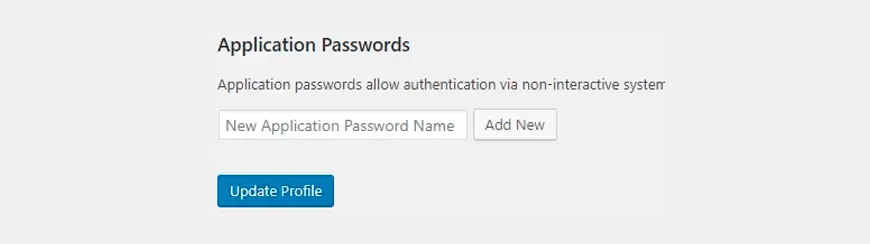
- Now generate a password and copy it safely, because it will only be shown once.

Step 3: Install Python & Create Virtual Environment
Create and activate a virtual environment in your project. Activating a virtual environment is recommended for Python packaging practice for third-party packages.
| python3 -m venv .venv source .venv/bin/activate |
On Windows
| py -m venv .venv .venv\Scripts\activate |
Step 4: Install the Python Requests Library
Installing requests is the simplest way to make authenticated HTTP calls from Python.
| python -m pip install requests |
Step 5: Prepare Your WordPress Connection Details
Ensure you keep the following things handy:
- WordPress username
- WordPress application password
- Website REST base URL
| https://yourdomain.com/wp-json/wp/v2 |
Step 6: Create First Python Script
Create a file wp_connect.py and use the following example to publish a post:
| import requests from requests.auth import HTTPBasicAuth WP_BASE = “https://yourdomain.com/wp-json/wp/v2” USERNAME = “your_wp_username” APP_PASSWORD = “your_application_password” post_data = { “title”: “Post created from Python”, “content”: “Hello from Python to WordPress REST API.”, “status”: “publish” } response = requests.post( f”{WP_BASE}/posts”, auth=HTTPBasicAuth(USERNAME, APP_PASSWORD), json=post_data, timeout=30 ) print(“Status Code:”, response.status_code) print(“Response:”, response.text) |
It works well because WordPress exposes POST /wp/v2/posts for creating posts, and the Requests library supports HTTP Basic Auth directly.
Step 7: Run the Script
Execute the Python file:
| python wp_connect.py |
WordPress will create the post and return a JSON response containing the new post record if authentication and permissions are correct. WordPress REST API uses JSON as the exchange format for setting up Python with WordPress.
Step 8: Test, Read, Update & Delete
You can perform basic CRUD operations after ensuring that the connection is working:
import requests
from requests.auth import HTTPBasicAuth

WP_BASE = "https://yourdomain.com/wp-json/wp/v2"
USERNAME = "your_wp_username"
APP_PASSWORD = "your_application_password"

response = requests.get(
    f"{WP_BASE}/posts",
    auth=HTTPBasicAuth(USERNAME, APP_PASSWORD),
    timeout=30
)

print(response.status_code)
print(response.json())
Update a post
import requests
from requests.auth import HTTPBasicAuth

WP_BASE = "https://yourdomain.com/wp-json/wp/v2"
USERNAME = "your_wp_username"
APP_PASSWORD = "your_application_password"
POST_ID = 123

update_data = {
    "title": "Updated from Python",
    "content": "This content was updated from Python."
}

response = requests.post(
    f"{WP_BASE}/posts/{POST_ID}",
    auth=HTTPBasicAuth(USERNAME, APP_PASSWORD),
    json=update_data,
    timeout=30
)

print(response.status_code)
print(response.text)
Delete a post
import requests
from requests.auth import HTTPBasicAuth

WP_BASE = "https://yourdomain.com/wp-json/wp/v2"
USERNAME = "your_wp_username"
APP_PASSWORD = "your_application_password"
POST_ID = 123

response = requests.delete(
    f"{WP_BASE}/posts/{POST_ID}",
    auth=HTTPBasicAuth(USERNAME, APP_PASSWORD),
    params={"force": True},
    timeout=30
)

print(response.status_code)
print(response.text)
As per the WordPress REST API reference, posts use:
- GET /wp/v2/posts to list
- POST /wp/v2/posts to create
- POST /wp/v2/posts/<id> to update
- DELETE /wp/v2/posts/<id> to delete
Now, if you have set up Python and WordPress, check out its benefits.
Benefits of Python WordPress integration
The following are the business as well as user benefits of setting up Python and WordPress.
Business Benefits
(1) Advanced Automation & Operational Efficiency
Running a content-heavy or high-traffic website with native tools often creates operational bottlenecks. Integrating Python eliminates manual, repetitive tasks by turning your website into a programmable asset.
Mass Content Generation & Scheduling
Python scripts can read data from external sources, such as Google Sheets, CSV files, or external databases, and create, format, and schedule thousands of localized pages or product descriptions via the WordPress REST APIs.
Bi-directional Inventory & Data Syncing
For businesses running WooCommerce, Python acts as the ultimate connector. It can instantly sync inventory levels, pricing changes, or order statuses between WordPress and external Enterprise Resource Planning (ERP) or Customer Relationship Management (CRM) systems like Salesforce, HubSpot, and SAP.
Omnichannel Marketing Automation
Python can listen for specific actions on your WordPress site (like a new blog publication or a user sign-up) and trigger immediate, automated workflows across other channels, such as posting social media updates, updating email marketing segments, or sending internal notifications to Slack.
(2) Seamless Integration of AI and ML
While WordPress excels at presenting content, it lacks native computational power to process complex data. Python is the industry standard for AI and ML, allowing you to bring advanced capabilities directly to your website visitors.
Proprietary Recommendation Engines
Instead of relying on generic plugins that guess what your users want to read or buy, you can feed user behavior data into Python libraries (like Scikit-learn). Python analyzes the data and dynamically updates the WordPress front-end with hyper-personalized product or article recommendations.
Automated Content Tagging & SEO
Python scripts use NLP (Natural Language Processing) to automatically scan uploaded drafts, generate accurate meta descriptions, suggest SEO keywords, and categorize or tag posts before they go live.
Custom AI Chatbot & Search
By connecting your WordPress database to a Python framework, you can build smarter internal search features and customer support bots that understand user intent better than basic keyword matching.
(3) Enhanced Website Performance & Architectural Scalability
Python integration allows businesses to separate resource-intensive processing from the WordPress application layer.
- Decoupled Architecture (Microservices): Move computationally intensive processes into independent Python services while WordPress focuses on content delivery and presentation.
- Scalable Processing: Python services can be scaled independently when workloads such as data processing, AI inference, or bulk operations increase.
- Security Isolation: Sensitive processing and integrations can be separated from the public-facing WordPress layer, reducing the amount of functionality directly exposed to website visitors.
- Background Processing: Long-running tasks can run outside the main WordPress request cycle, reducing the risk of slowing interactive website operations.
(4) Business Intelligence & Advanced Analytics
Python can turn WordPress and WooCommerce data into actionable business insights.
Advanced Data Visualization
Businesses can process website, customer, sales, and marketing data using Python analytics libraries and generate dashboards or visual reports that make trends easier to understand.
Predictive Customer Analytics
Machine learning models can analyze historical customer behavior to identify purchasing patterns, segment customers, estimate churn risk, or support more informed marketing decisions.
(5) Cost Efficiency and Faster Time-to-Market
Python integration can help businesses extend their existing WordPress investment instead of replacing the entire platform when they need more advanced functionality.
Extend Existing Infrastructure
Businesses can retain WordPress for content management and add Python services for specialized requirements such as AI, analytics, automation, or complex integrations.
Rapid Prototyping and MVP Development
Python’s extensive ecosystem allows development teams to quickly test AI models, automation workflows, data-processing systems, and custom functionality before investing in a larger production implementation.
User Benefits
(1) Advanced Content & Workflow Automation
Integrating Python allows you to treat WordPress as a programmatic output layer rather than a manual editing environment.
Automated Content Integration
Python scripts ingest unstructured data from external APIs, RSS feeds, or databases, map the fields dynamically, and post fully formatted HTML articles straight into WordPress via the REST API.
Bulk Content Modernization & Maintenance
Python data toolkits let you programmatically scan thousands of published posts to update obsolete URLs, bulk-assign taxonomic tags, and clean up broken HTML elements in seconds.
Scheduled Operations
Offloading heavy workflows from the native WordPress cron system to server-side cron jobs and Celery workers ensures reliable execution of resource-heavy tasks like nightly data sweeps or draft archiving without timing out.
(2) ML and Advanced Feature Injection
WordPress natively relies on PHP, which lacks mature machine learning libraries. Python bridges this gap to offer production-ready AI capabilities.
Custom Recommendation Engine
Python scripts can run clickstream analytics behind the scenes to deliver highly relevant, hyper-personalized post or product suggestions, rather than relying on generic tags.
Natural Language Processing (NLP) Moderation
You can pass user-generated comments or forum submissions through Python packages like spaCy or transformers to flag hate speech, detect spam patterns, and perform sentiment analysis before publication.
Dynamic E-commerce Pricing
By evaluating real-time competitor pricing, stock levels, and historical demand shifts, Python Scripts calculate optimized item pricing and updated WooCommerce values instantaneously.
(3) Enterprise Data Analytics & Business Intelligence
Moving heavy computational processes out of the WordPress database prevents operational lag and offers enterprise-grade reporting.
WooCommerce Data Warehousing
Python pipelines extract raw transactional data from the production database, transform it into structured reporting schemas, and load it directly into dedicated analytical databases like BigQuery and Snowflake.
Predictive Sales Forecasting
Using advanced mathematical models built with pandas and scikit-learn, businesses can accurately project inventory demands, seasonal sales revenue, and future customer churn directly from historical shop data.
(4) Seamless Enterprise System Integration
Python serves as a highly adaptable operational bridge between core corporate infrastructure and your public web presence.
Inventory & ERP Synchronization
Python automation acts as reliable middleware, connecting legacy enterprise resource planning (ERP) systems like Odoo or SAP to your online storefront and aligning stock levels every few minutes.
Centralized User Management
Python scripts can listen to employee onboarding hooks inside internal corporate directories and automatically provision, modify, or deprecate corresponding WordPress user accounts and capabilities.
5. Offloading Server Load for Better Performance
Executing heavy processing alongside web requests degrades the end-user experience. Python allows you to maintain a lightning-fast frontend.
Decoupled Processing:
Complex tasks like large-scale image manipulation, PDF document generation, and video transcoding are handled outside the web server environment, keeping the core PHP memory pool fully available for user traffic.
Microservices Architecture:
By breaking out heavy applications into specialized Python-driven microservices connected via lightweight API gateways, your infrastructure gains structural isolation, ensuring that a sudden spike in background data syncing never takes down your public website.
Conclusion
Integrating Python with WordPress extends the platform beyond its native PHP-based capabilities by adding powerful automation, data processing, AI/ML, analytics, and integration capabilities. The WordPress REST API provides a practical way to connect external Python applications without placing resource-intensive workloads directly on the WordPress application layer.
From automating content and synchronizing business data to building intelligent features and offloading heavy processing, Python helps businesses create a more flexible, scalable WordPress architecture. By combining WordPress for content and presentation with Python for specialized processing, organizations can enhance their existing infrastructure while supporting more advanced digital requirements.
If you are planning to set up Python and WordPress, contact us now; we will review your requirements and help you integrate Python with WordPress seamlessly.
FAQs
(1) Is WordPress outdated in 2026?
No, WordPress is not outdated in 2026, as it still powers 43% of all websites on the internet.
(2) How do I run PHP scripts in WordPress?
You can’t paste PHP code directly into the standard WordPress block or classic editor due to security restrictions. Instead, the best and safest way to add PHP code to a specific page is to turn it into a shortcode using a snippet plugin or manually edit your theme.
(3) What is the purpose of using Python with WordPress?
The primary purpose of using Python with WordPress is to automate content management, handle complex data processing, and leverage advanced libraries (like ML and data analytics) that the native WordPress language, PHP, is not optimized for.
(4) How can I handle errors when connecting Python and WordPress?
To handle errors when connecting Python to WordPress (typically via the WordPress REST API), use a try-except block with the Requests Library and check for HTTP status codes.
(5) Is it safe to store WordPress credentials in a script?
No, it is never safe to hardcode or store WordPress credentials directly in plain text within a script.
Table of Contents